
Blog

These repair posts and complete guides are for people deciding what to do with broken phones, tablets, laptops, desktops, game consoles or drives. Posts draw on makers' support pages, prices published by shops and the directory's own data to explain checks, repair costs and next steps for repair or data recovery. Each post ends with local shops to compare in RepairSeeker, a neutral United States directory where shops pay nothing to be listed.

Latest posts

Illustration of a smartphone resting on a repair bench beside a screwdriver set and other repair tools.

Samsung moisture detected won't go away: what should you do?

If Samsung's moisture detected warning won't go away, power off your phone and leave it to dry completely. Unplug the phone from its charger, then wipe it with a dry cloth. If Samsung's troubleshooting instructions don't work, contact Samsung Support or take the phone to a Samsung Service Center.

4 min read

Illustration of a smartphone with a dark screen and a charging cable plugged into its port on a pale blue surface.

Samsung wireless charging not working: what should you check?

If Samsung wireless charging is not working with a Samsung charger, check that your phone supports wireless charging. Check for debris on the phone's back and the charger's surface. If your compatible phone still won't charge wirelessly after troubleshooting, Samsung directs you to a service center or repair.

4 min read

Illustration of an open aluminum laptop with the Apple logo and a half-filled progress bar on its dark screen.

MacBook stuck on Apple logo: what should you try?

A MacBook stuck on the Apple logo during a macOS update should be left to finish overnight if needed, as Apple recommends. If startup never progresses, hold the power button for up to 10 seconds until it turns off. A MacBook still showing the logo after reinstalling macOS from Recovery might need service.

4 min read

Illustration of a tablet lying face down on a repair bench beside a bagged replacement battery and screwdrivers.

iPad battery replacement cost by model

iPad battery replacement cost ranges from $99 to $199 for the listed models in Apple's out-of-warranty estimates. The fee depends on your iPad model. Apple's estimated out-of-warranty service fees may be subject to tax, so the listed price isn't necessarily the final total.

3 min read

Illustration of an open aluminum laptop with a black screen on a pale surface against a soft blue background.

MacBook black screen: what to check before repair

For a MacBook black screen at startup when the Mac seems on, follow Apple's order: restart, Recovery disk repair, then reinstall macOS if it persists. First, hold the power button for up to 10 seconds until it turns off, then turn it on again. If it still starts to a blank screen afterward, it might need service.

4 min read

Illustration of a smartphone with a dark screen and a charging cable plugged into its port on a pale blue desk.

iPhone not charging: What should you check first?

For an iPhone not charging, start with the cable, adapter, outlet and charging port debris checks from Apple. First, inspect the cable and adapter for damage, including breakage or bent prongs. If your iPhone still won't power on or charge after Apple's charging and force-restart sequence, it might need service.

4 min read

Illustration of a closed silver laptop on a pale blue desk with a charging cable connected to a US wall outlet.

MacBook Won't Turn On? What to Check Before Repair

For a MacBook that won't turn on, check for cable damage, secure connections at the Mac and a working outlet, then try another compatible adapter if available. If it still doesn't turn on after you finish the checks, Apple says the MacBook might need service.

3 min read

Illustration of a face down smartphone beside an unplugged USB-C cable and US wall adapter on a pale blue background.

Phone Not Charging? What Should You Check First?

A phone that won't charge needs checks: Apple's iPhone steps are to secure wall outlet, adapter and cable connections, remove port debris, then plug in firmly. Charge for half an hour, force restart if it won't power on, then charge another half hour, after which failure to charge might mean it needs service.

3 min read

Illustration of an open smartphone showing its battery, main circuit board and black chips.

Memory Chip Prices Are Up. Which Repairs Are Affected?

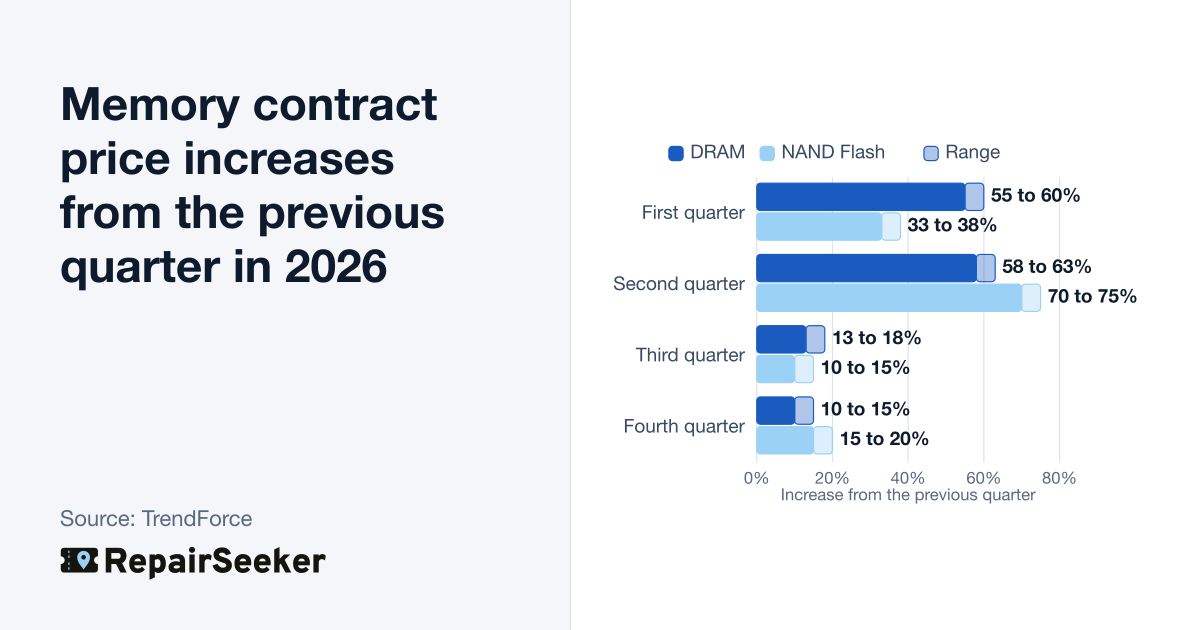
Rising memory chip prices don't raise screen, battery or charging-port repair costs, because those repairs don't use memory chips. Main board swaps and storage or RAM (working memory) upgrades do involve memory chips. TrendForce forecasts contract prices for DRAM, the chips that run apps, rising 10% to 15% from the previous quarter in the fourth quarter of 2026.

3 min read