
Find Xbox HDMI Port Repair Near You
25 shops in California, Illinois, New Jersey, New York, and Pennsylvania say on their websites that they offer Xbox HDMI port repair. Visitors can walk in at 17 shops, and each says so on its own website.
Xbox HDMI Port Repair by city
Why your Xbox has no picture
A cable snag can bend an Xbox HDMI port or pull it loose. If the picture vanished during a move, mention that when you call.
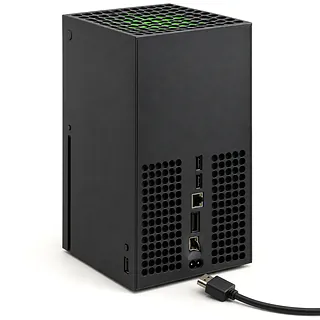
Xbox turns on with no picture
A startup glitch can leave the TV blank even though the console powers on. Hold the console's power button until it turns off, unplug its power cord, then plug it back in and restart.
Find a repair near you: Xbox turns on with no pictureNo signal from Xbox
A bad HDMI cable can stop video from reaching your TV. Try a spare cable and another TV input, then use Microsoft's startup troubleshooting instructions for your Xbox model.
Find a repair near you: No signal from XboxScreen flashes during games
Worn cable contacts or a loose connection can make the screen flash. Notice whether it happens while everything sits still, too.
Find a repair near you: Screen flashes during gamesHDMI plug won't go in
Bent contacts can catch the plug before it goes all the way in. Stop pushing if it won't slide in normally.
Find a repair near you: HDMI plug won't go inPicture cuts out when cable moves
A damaged cable or broken port connection can cut the picture when the cord shifts. Don't prop it up to hold an angle. A shop can replace a broken connector by desoldering it and soldering another onto the board.
Find a repair near you: Picture cuts out when cable moves

What Xbox HDMI repair involves
Testing comes before opening the Xbox: a full power cycle, a cable swap and checks at the television help rule out faults outside the console. The technician then checks the HDMI opening and its soldered joints, especially after a move with HDMI connected.
On Xbox models with built-in HDMI, the damaged connector comes off the board through desoldering. Its replacement must match the model, and the small electrical connections need careful soldering. If testing points to the adjacent video chip as well, changing just the port won't complete the job.
A factory reset isn't a routine part of replacing this connector. Discuss any request to erase storage before work proceeds. Once assembled, the Xbox should be checked for normal startup, HDMI sound and stable video at the settings you intend to use.
Should you fix the Xbox HDMI port
Replacing the Xbox deserves a closer look if it was already shutting down or refusing to start before the HDMI cable got pulled. Ask for a written quote that includes those faults as well as the port.
For an aging console, check that the games you play still work and that Microsoft still supplies the software updates you need. Ask the repairer to check for a matching connector before you commit.
Tell the repairer about saved games you haven't backed up. Discuss how to keep them before approving a reset or giving up the console.
What to ask about the repair
Which port would you use for this Xbox?
Ask who makes or supplies the replacement and how it's matched to your console. Name the exact Xbox model when calling.
How will you test the console before soldering?
No signal doesn't prove the connector is broken. Ask how cable trouble and video chip damage are ruled out, then which picture checks follow the repair.
Which faults does your written warranty cover?
Check whether coverage includes the replacement connector and its solder joints. Another cable pull may be treated differently from a repair that stops working.
Does testing require access to my profile?
Keep your Microsoft password private. Have the repairer explain any requested console passcode and record that erasing games or saves needs your permission.
What charges apply if the Xbox still has no picture?
Settle fees for testing, declining the work and an unsuccessful attempt. Request a written quote that separates port replacement from any additional board repair.
What to check before drop-off
Remove cables before lifting
Power the console off, then unplug its connections before moving it. Pack detached storage and controllers separately only if they're needed for testing.
Note any game left inside
For an Xbox with a drive, remove the disc using its eject button. Leave a stuck game alone and mention it when dropping off the console.
Protect saves before leaving
Make whatever backup your model supports while a picture is available. A dead display may prevent this, so explain that your saves could lack a backup.
Agree on testing access
Keep your online login secret and account security enabled. Ask how console passcodes or family controls affect the planned checks, and withhold consent for erasing data.
Bring a short fault history
Give the date symptoms began, what the TV displays and any known pull on the port. List the cables and inputs you've tested.
Related repairs
Xbox HDMI Port Repair: common questions
What's the likely bill for Xbox HDMI port repair?
With Xbox HDMI port repair, cost depends on what needs to be done to your device. Ask for a quote using the model name and the symptoms you've noticed.
Why can Xbox HDMI port repair take longer than expected?
Before arranging a visit for Xbox HDMI port repair, request a rough estimate by phone. The shop can judge the timing better with a clearer picture of the damage, though their workload also affects the wait.
Does keeping my Xbox make more sense than buying another?
Age alone doesn't tell you whether to keep a device. Get a quote and think through the cost, what else needs fixing, which files you need and how much you want to keep using it.
Where should I start when preparing for Xbox HDMI port repair?
Back up files you can reach while your device is working, and write down its exact model plus what stopped working. When booking by phone, check whether the charger should come along, the case should stay on and a passcode will be needed.
Can an Xbox HDMI port be repaired?
Xbox HDMI repair involves removing the faulty port with soldering equipment and installing another one. A new connector won't fix damage to the video chip beside it, which needs to be checked separately.
Why does my Xbox turn on but show a black screen?
An Xbox black screen can come from the cable, TV input or console even when the power light is on. Test another HDMI cable and input. For a full power cycle, hold the power button until shutdown, unplug the Xbox, then reconnect it.
How can I tell if my Xbox HDMI port is damaged?
A port that looks bent or loose inside points to physical damage. No signal and flickering can also happen with a faulty cable, so those symptoms alone don't confirm that the Xbox needs a replacement connector.
Why do Xbox HDMI ports break?
An HDMI cable that gets yanked can bend the port or pull its soldered connections loose. Shifting an Xbox while that cable is still attached puts strain on the connector, so disconnect it before moving the console.
Can an Xbox video chip cause no signal?
An Xbox can lose video because of chip damage beside the HDMI port. A new connector won't resolve a fault in that chip, and the repairer can test for both before you approve additional work.
Will my Xbox Series X or Series S keep HDMI 2.1 after repair?
A properly repaired HDMI port should still support HDMI 2.1 on both Xbox Series S and Xbox Series X. Have the console checked with the video modes you normally select, rather than treating a startup picture as the whole test.