
Find PS4 Repair Near You
In their own words, 31 shops offer PS4 repair. Browse the states to find help close to home.
Choose a city to look for PS4 repair
PS4 console and controller problems
PS4 controller charging cuts out
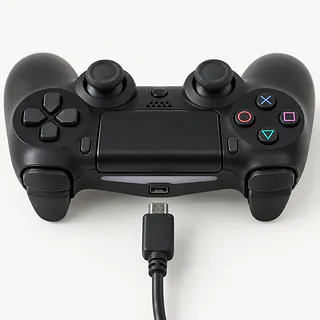
A loose micro-USB plug or worn cable can interrupt PS4 controller charging. Test a different cable with the PS4 powered on. Holding the cable at an angle isn't a fix for a worn port.
Find a repair near you: PS4 controller charging cuts out
PS4 won't start
Power supply trouble can keep the PS4 dark, but check for an unplugged cord first. Try a second outlet too. Mention any beep when calling about the repair.
Find a repair near you: PS4 won't start
PS4 gets hot during games
Packed dust and dry thermal paste make cooling harder. Leave space around the air vents. If temperature warnings continue, a shop can check the fan and clean inside.
Find a repair near you: PS4 gets hot during gamesPS4 blue light stays on
Boot failure leaves the light pulsing blue instead of turning white. A failed update, bad hard drive, power trouble or a failed main board can be behind it. With the PS4 off, hold its power button until the second beep to try Safe Mode, avoiding initialization options that erase data.
Find a repair near you: PS4 blue light stays on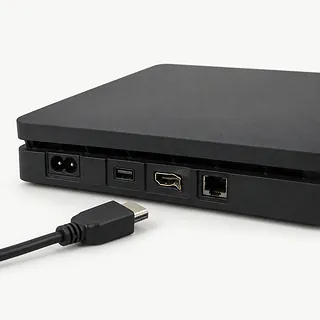
PS4 picture disappears
A failing HDMI cable or broken port can cut the picture. Check which television input is selected and test a spare HDMI cable unless the port looks bent.
Find a repair near you: PS4 picture disappears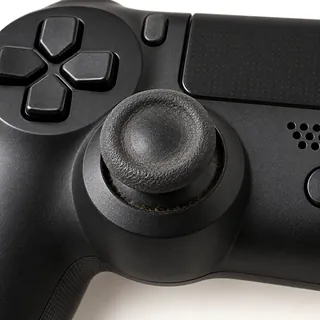
PS4 aiming drifts
Stick wear often causes unwanted movement across several games. Replacing the worn mechanism is repair work, and changing settings won't mend it.
Find a repair near you: PS4 aiming drifts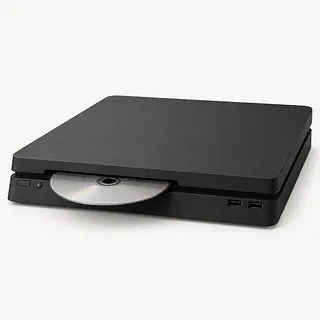
PS4 disc won't go in
Loading trouble can stop a disc before reading even begins. Don't push harder against resistance or insert another disc when one may already be inside.
Find a repair near you: PS4 disc won't go in


What PS4 repair involves
Bring the controller that misbehaves if charging or drift is the problem. The technician checks it using a working cable and watches for stick input with nobody touching it. For console trouble, describe exactly what happens, including lights, warning messages and whether discs go in.
Repair follows those tests. A loose charging port, tired battery or worn stick may need replacing inside the controller. Console checks can point to HDMI soldering, internal dust removal and fresh paste, or work on the disc drive. A machine stuck during startup also needs its software, storage, power supply and main board checked.
Drive replacement starts with a discussion about saves, because installing another drive doesn't copy them across. The PS4 needs its system software reinstalled and any available backup restored. Checks afterwards should recreate the trouble at home, such as a game that triggered shutdowns, lost video during play or a controller that kept losing charge.
Deciding whether to repair your PS4
Keep the games you actually play in mind when deciding what to do with an aging PS4. Check Sony's software support announcements and whether online features you use remain supported. A newer machine isn't automatically needed just because yours is old.
Ask which parts can be found for your model before committing to repair. Cleaning a noisy fan may be worthwhile on an otherwise healthy console, while repeated shutdowns plus a broken disc drive deserve a quote that covers both. Stick drift alone leaves the console out of that decision.
Check your backups before dropping off a PS4 with progress you want to keep. Explain which saves have no other copy and ask how the repair would affect them. Buying a replacement won't retrieve missing progress from the broken machine.
Questions before booking a PS4 repair
How do you test a PS4 that overheats?
A fan that sounds like a hair dryer needs more than a noise check. Ask how they'll check cooling before starting and test the console under load afterward.
Who supplies the controller parts you use?
For a PS4 controller repair, ask who supplies the part and why they've chosen it. Have them spell out whether it has already been used.
What permission do you need to access game data?
Agree on which local profile they may use for testing. Erasing storage or resetting the console should require your approval, with the effect on saves explained first.
How would you handle the same fault returning?
Request the warranty terms on paper. Find out whether coverage includes both the installed part and the work, and which faults fall outside that coverage.
Is an unsuccessful repair attempt still billable?
Separate the charge for finding the cause from charges for attempted repairs. Settle what you owe if you choose to pick it up unrepaired.
Before handing over your PS4
A short recording can show a fault that disappears at the counter. Capture unwanted stick movement or a picture cutting out, and note when it began.
Make a copy of game progress
Use the backup options in settings while the console remains usable. Flag saves you couldn't copy.
Discuss locked profiles
Mention login restrictions and parental settings before leaving the PS4. Arrange access for agreed tests without handing over your online account password.
Check what is still inside
Try normal ejection if a disc is loaded. Leave a jammed game alone and tell the person taking the console.
Confirm which extras are needed
Ask whether to include the controller and charging cable. Turn off the console, then detach its cables and external storage for transport.
Related repairs
PS4 Repair: common questions
How can I check who offers PS4 repair nearby?
Nationally, 31 shops list PS4 repair on their websites. Look up your city, then phone someone nearby to check whether they can work on the exact model you have.
How much would I pay to have my PS4 fixed?
The damage can affect how much work your device needs. Explain what happened, name the model and ask for a quote by phone.
Do I need to leave it with the shop for long?
On the phone, ask the shop to estimate the time for PS4 repair, including any queue. They may revise that estimate if the damage needs more work than expected.
How do I decide what to spend on PS4 repair?
Start by getting a quote, then look at what you'd be spending to keep the device. Its age, other damage, the data it holds and how much use you expect from it should all shape your decision.
What do I need to do ahead of PS4 repair?
List your device's exact model and the signs of trouble, keeping a backup of files you can reach if it's working. Bring up the passcode when you call, and ask if the case and charger need to come too.
Why won't my PS4 turn on?
Power trouble can keep a PS4 off, while a pulsing blue light that never turns white means it has failed to boot. That startup failure can come from an unsuccessful update, the hard drive, power or the main board. The light alone doesn't identify the repair.
Why is my PS4 fan so loud and overheating?
The fan often gets louder when dust blocks cooling or the thermal paste ages. Having a repairer clear that dust and renew the paste can reduce noise and help with heat. Give air room to move around the console, especially if it has been shutting itself off.
Does PS4 no signal mean the HDMI port needs repair?
No picture isn't enough to blame the HDMI port. Check the television input and swap cables before agreeing to port work. Bent contacts or a port that moves inside the case make a damaged port more likely, though it still needs testing.
Why is my PS4 controller not charging?
The micro-USB port on a PS4 controller wears with use, and a failed cable or battery can also stop charging. Try a spare cable that charges another controller. Tell the repairer if the plug wiggles or only connects when held at an angle.
How do you fix PS4 controller drift?
Cleaning won't undo wear in a PS4 controller stick, though it can help when dirt causes drift. A worn stick mechanism may need to be replaced by a repairer. Afterward, the controller should register a centered stick without moving the character or camera.
Why is my PS4 disc drive not working?
A PS4 that won't read a game may have trouble with that disc or with the drive itself. Try another clean, undamaged PS4 game disc. If several fail, a shop can test the drive, and a trapped disc should be left alone.