
Find PS5 HDMI Port Repair Near You
In their own words, 18 shops offer PS5 HDMI port repair. Browse the states to find help close to home.
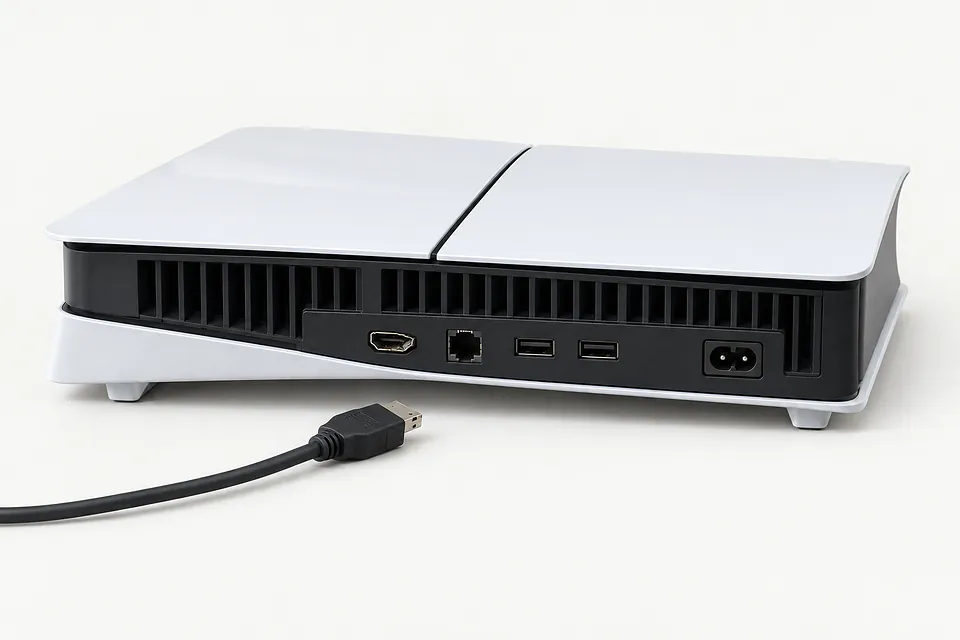
PS5 HDMI Port Repair by city
Why a PS5 loses its picture
A black screen doesn't prove the PS5 HDMI port is broken. Start with the cable and TV input, unless you can already see bent metal inside the port.
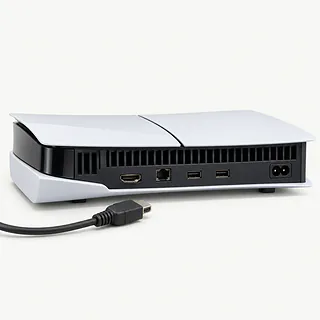
PS5 black screen
A bad cable can leave the screen black even with an undamaged port. Try another HDMI cable and a different TV input. If the plug won't fit straight, stop pushing.
Find a repair near you: PS5 black screenTV says no signal
No signal means the TV isn't receiving a picture from that input. Check that you've selected the port the cable actually connects to. A nearby video chip can also fail, so the message alone doesn't identify the broken part.
Find a repair near you: TV says no signalPicture flickers or cuts out
A loose HDMI connection can make the picture disappear and return. Swap the cable first, without wiggling it around to find an angle that works.
Find a repair near you: Picture flickers or cuts outHDMI port looks bent or loose
Moving the console with the cable plugged in is a common cause. A shop replaces the damaged port by desoldering it from the board and soldering in a new one.
Find a repair near you: HDMI port looks bent or loose
Blue light keeps pulsing
Blue pulsing that never turns white means the console isn't finishing startup. Try Safe Mode by holding the power button until the second beep, starting with the PS5 turned off. Replacing the HDMI port alone may not help.
Find a repair near you: Blue light keeps pulsing


How a PS5 HDMI port gets fixed
A black screen doesn't prove the PS5 HDMI port is broken. The technician tries another cable and TV input, checks that the console starts, then looks for bent pins or a port that's come loose. A blue light that keeps pulsing points to trouble starting up.
The broken port has to be desoldered from the board before a new one goes in. Those small connections need microsoldering, including on the PS5 Slim and PS5 Pro. If the nearby video chip was damaged too, replacing the port alone won't finish the repair. That chip is a separate job.
Saved games don't need transferring for a port replacement, and there's normally no setup to repeat. Once the console is back together, the technician checks startup and watches for flickering, a black screen or a picture that cuts out.
Weighing PS5 repair against replacement
A PS5 that lost its picture when someone yanked the cable may be worth keeping. If a damaged port is the only fault, replacing the entire console may be unnecessary. A bent port plus regular overheating is a different decision. Have both problems included in the quote, and check that a matching connector can be sourced.
An older model can still earn its place if your games ran well before the cable accident and Sony continues to supply software updates. Replacement makes more sense if you were already unhappy with it or several repairs are needed. Don't forget saves held only on the broken console. Ask what can be kept before dropping it off.
What to ask the repair shop
Which replacement port will you install?
Ask where the part comes from and how it's matched to your PS5 model. The cable should sit firmly in the replacement without needing pressure to hold a picture.
What will you test before and after soldering?
A black screen doesn't prove the port is broken. Testing should separate a damaged connector from a cable fault or trouble with the nearby video chip.
What does your repair warranty cover?
Get the coverage in writing, including what happens if the picture disappears again. Ask how a failed solder joint is handled compared with another cable yank.
Will you need access to my account?
Find out which tests need a signed-in user and who can access saved data. Keep your online account password private.
Is there a testing fee if I decline?
Ask what you'll owe if testing finds more than a broken port and you decide against the work. Request a written quote before approving repairs.
Before handing over your PS5
Leave extras behind
Bring the controller and cables only if the shop asks for them. Turn the PS5 off, unplug connected storage and pull out its HDMI cable before carrying it.
Eject the disc
For consoles with a drive, take the game out normally. Don't force it if it's stuck.
Mention missing backups
A dead display can leave you unable to make a backup. Explain that before handing over the console, or copy your game data if the screen still works.
Keep account security on
Find out whether a console login passcode will block testing. Don't include your PlayStation password with the repair paperwork.
Bring a note about the fault
Write down when video stopped working, whether the power light turns white and what happened with another cable or TV input. Include any attempt to start Safe Mode.
Related repairs
PS5 HDMI Port Repair: common questions
How can I check who offers PS5 HDMI port repair nearby?
For a place to call about PS5 HDMI port repair, start with the cities in your state. There are 18 shops nationally who list this work themselves, and you'll need to check that they take your exact model.
What's the likely bill for PS5 HDMI port repair?
With PS5 HDMI port repair, cost depends on what needs to be done to your device. Ask for a quote using the model name and the symptoms you've noticed.
Should I expect a long wait for PS5 HDMI port repair?
More extensive damage can make an early estimate for PS5 HDMI port repair less accurate, and a busy shop may need longer to start. Call to request a timeframe for the whole job.
Is a repair quote enough to tell me whether to replace a device?
Before committing to more work, ask for a quote and list any other faults. Weigh the device's age and the cost against how much you depend on it and the files you want to keep.
How can I get ready for PS5 HDMI port repair?
If the device works well enough to copy files, save what you can and note its model number and symptoms. Call to check what to do about a passcode, protective case or charger.
Why does my PS5 say no signal?
A bad cable or the wrong input can leave the TV saying no signal even when your PS5 works. Try a spare HDMI cable and another TV input, then see if the console starts in Safe Mode.
Can I fix my PS5 HDMI port without taking it apart?
A cable swap won't mend a bent or broken port. Replacing that part means opening up the PS5 for soldering work. Don't rock the plug sideways to try to bring the picture back.
How is a PS5 HDMI port fixed?
A shop removes the broken HDMI connector with soldering equipment, then solders a new port onto the board. The video chip beside it may also need repair if it was damaged.
Why does my PS5 HDMI port keep breaking?
Repeated cable pulls can damage a replacement port just as they broke the original. Keep the cord out of places where it gets snagged, and detach it before moving your console.
Is my PS5 black screen caused by the HDMI port?
A PS5 that fails to boot can leave your TV blank even with an intact HDMI connector. A power light stuck flashing blue without becoming white points to that startup problem.
Can PS5 Slim and PS5 Pro HDMI ports be repaired?
A broken HDMI connector is repairable across the PS5 lineup. Original, Slim and Pro consoles need a port that fits their model, so include that detail when contacting a shop.