
Find PlayStation Repair Near You
For help close to home, search 36 shops that say they handle PlayStation repair. Find your city and ask about your exact model.
Game console repair in Philadelphia, PAGame console repair in Cherry Hill Township, NJGame console repair in Wilmington, DE
PS5 and PS4 trouble signs
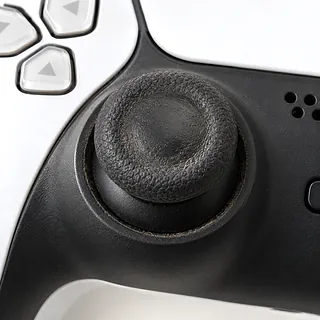
PS5 controller drift
Worn sticks can send your aim sideways after you let go. Dirt sometimes causes drift too, but replacing a worn standard DualSense stick takes soldering.
Find a repair near you: PS5 controller drift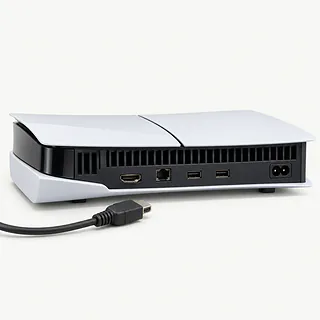
PS5 HDMI port looks bent
Moving the console with HDMI still attached can bend the port. Don't force the plug back in. If nothing looks bent, try another cable and check the TV input.
Find a repair near you: PS5 HDMI port looks bent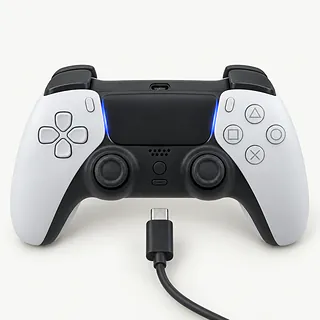
PS5 or PS4 controller not charging
Try a spare charging cable before blaming the battery. DualSense takes USB-C, while the PS4 controller uses a micro-USB port that can wear loose.
Find a repair near you: PS5 or PS4 controller not charging
PS5 and PS4 overheating
Dust clogging the fan and heatsink can trigger shutdowns. Leave space around the vents. A loud PS4 may also need its dried thermal paste replaced.
Find a repair near you: PS5 and PS4 overheating
PS5 controller not connecting
A USB cable can charge the controller yet lack the data connection needed to pair it. Use a cable that carries data, then press the PS button.
Find a repair near you: PS5 controller not connecting
PlayStation won't turn on
A loose cord or failed power supply can leave either console unresponsive. Check the power cord at both ends and try a working wall outlet. Tell the shop if pressing power gives a beep, a light or nothing.
Find a repair near you: PlayStation won't turn on
PS4 blue light of death
Blue pulsing that doesn't become white means startup has stalled. A failed update, hard drive, power supply or main board can be behind it.
Find a repair near you: PS4 blue light of death
PS5 disc drive not working
One scratched game can make the drive look broken. Test another clean, undamaged disc before assuming the drive has failed.
Find a repair near you: PS5 disc drive not working


What happens at the repair bench
Testing your controller against a working one helps pin down which device is broken. The technician also checks cables, power and startup before choosing parts. Mention what happened just before the failure, such as the console falling or a plug getting pulled sideways.
A broken HDMI port gets desoldered, then its replacement is soldered onto the board. Damage to the PS5 video chip beside it needs its own repair. Worn standard DualSense sticks also require soldering, while a loose PS4 controller charging port calls for port work. Cooling repairs remove trapped dust and may include fresh PS4 thermal paste or delicate work with PS5 liquid metal.
Ask what could erase your saves before approving a reset or storage replacement. A new PS4 hard drive needs system software installed and available backups restored. Afterward, testing should cover the original fault, from a controller that holds a charge to a console that keeps running games without losing its picture.
Deciding whether to keep your PlayStation
A PS5 with both board damage and disc trouble may be harder to justify keeping than an older PS4 needing one repair. Have the full job put in writing, including any other broken parts found during testing.
Parts availability can settle the choice before the console's age does. Ask which parts the work needs and whether they're available for your exact model. Check Sony's ongoing software support too, especially if online play matters to you.
Saved games deserve a separate answer before you approve replacement hardware. Ask what can be kept and what would be lost if storage is erased. For charging trouble or drift alone, judge the controller by its condition without writing off a working console.
Questions before booking PlayStation repair
Does your work include this console or controller model?
Name the PS4 or PS5 version and describe the fault. A worn PS4 controller charging port, drifting DualSense stick and broken HDMI port involve different repair work.
What replacement are you planning to use?
Find out who makes or supplies the part and whether it's new or used. For standard DualSense drift, ask whether they're replacing the soldered stick module.
Can you reproduce the fault before starting?
Explain the trigger, such as losing the picture when a cable moves. Ask for the same check after repair, including picture and sound after HDMI work.
Who can open my profile during testing?
Set boundaries for access to saved games and account details. Tell the repairer to ask separately before doing anything that could erase saves.
What applies if the fault stays or returns?
Request written warranty coverage for parts and labor, including exclusions. Also settle charges for testing or unsuccessful work before handing anything over.
Prepare your PlayStation for drop-off
Describe exactly what stops working
Write down when the fault started and what triggers it. Mention a controller charging only at an angle or a console shutting down during a game.
Copy your game progress
Use the console's backup menu if it still works. Tell the repairer which saves have no other copy.
Ask about the login code
Find out if testing needs your local user passcode or changes to parental settings. Your online password should stay private, with account security left on.
Get any disc out before packing
Use the usual eject control if there's a game loaded. Say if it's stuck, and don't pull at it.
Check which extras they want
Shut the PlayStation down, then unplug its cables and attached storage. Only pack controllers or charging cables requested for the repair.
Related repairs
PlayStation Repair: common questions
Can I search by city for PlayStation repair?
Nationally, 36 shops list PlayStation repair on their websites. Look up your city, then phone someone nearby to check whether they can work on the exact model you have.
What should I expect to pay for PlayStation repair?
With PlayStation repair, cost depends on what needs to be done to your device. Ask for a quote using the model name and the symptoms you've noticed.
Could heavy damage make PlayStation repair take longer?
Treat a phone estimate for PlayStation repair as a rough guide. Ask how much time to allow, including any wait behind other jobs or extra work the damage might need.
Should I pay for PlayStation repair if I rarely use the device?
Ask how much the work would cost before deciding, even if you've had the device for years. Compare the quote with its age, any other damage, the files stored on it and how much you still need it.
What should I bring when I go for PlayStation repair?
If the device works well enough to copy files, save what you can and note its model number and symptoms. Call to check what to do about a passcode, protective case or charger.
Can you fix stick drift on a PS5 controller?
PS5 controller drift is often repairable, though cleaning won't undo wear inside a stick. Worn modules are generally replaced with soldering work on standard DualSense controllers. The Edge has removable modules, and dirt-related drift sometimes clears with cleaning.
Can a PS5 HDMI port be fixed?
A broken PS5 HDMI port can be replaced by desoldering the old port and soldering in another. For a black screen, try a working HDMI cable and a different TV input first. Damage to the nearby video chip can also cause picture loss.
Why is my PS5 or PS4 controller not charging?
Controller charging faults can come from the cable, port or battery. Test a different suitable cord and USB supply before blaming the controller. The DualSense connector is USB-C, and Sony's PS4 controller has a micro-USB port that can wear out.
Why does my PS5 or PS4 keep overheating?
Blocked airflow often explains repeated overheating on a PS4 or PS5. Keep ventilation openings uncovered, and ask a repairer about removing dust inside. Fresh paste may help a PS4, but work on PS5's liquid metal is more delicate than routine cleaning.
Why won't my PS5 or PS4 turn on?
Power trouble can keep either console off, and a blue light stuck pulsing signals a boot failure. Try a different working outlet after checking that the cable is firmly connected. A PS4 can also struggle to start after an unsuccessful update or drive failure.
Why is my PS5 controller not connecting?
A DualSense may have lost its pairing, and a cable that only charges won't reconnect it through USB. Plug it into the PS5 using a cable that carries data, then press the PS button. Restart the console and change cables if it still won't pair.