
Find Apple Watch Screen Repair Near You
As of October 2026, 19 shops across New Jersey and Pennsylvania advertise Apple Watch screen repair on their websites. Sunday hours are up on Google for 14 shops, and 7 shops posted a weekday closing time past the early evening. There's no need to schedule a visit at 10 shops, whose websites say they welcome walk-ins.
Apple Watch Screen Repair by city
Common Apple Watch screen problems
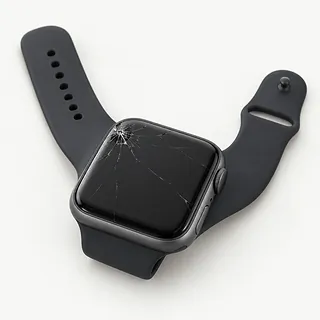
Cracked Apple Watch face
An impact may break the cover, the panel underneath or both. Check whether the image has changed and whether swiping still works. Those details help explain what happened beyond the visible crack.
Find a repair near you: Cracked Apple Watch faceWatch glass looks scratched
Scratches usually affect the surface rather than the pixels below it. Ultra watches use a sapphire front crystal, which resists scratches better than the glass on aluminum Series watches. Screen replacement for marks alone is a cosmetic choice.
Find a repair near you: Watch glass looks scratchedScreen taps things by itself
A damaged touch layer can register contact that never happened. This is called ghost touch. If it started with a fall, mention the unwanted taps even when the picture looks normal.
Find a repair near you: Screen taps things by itselfWatch face has dark patches
Dark patches within the picture suggest a damaged panel, especially after a hard hit. Pressing the spot won't mend it. Repair needs to account for the display beneath the cover.
Find a repair near you: Watch face has dark patchesPicture keeps flashing
A flickering image can follow physical damage, although software can also interrupt the picture. Restart the watch if there's no visible break, then note whether the flashing returns.
Find a repair near you: Picture keeps flashing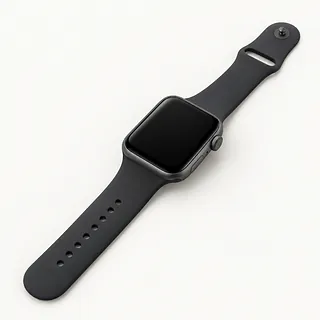
Screen is black despite alerts
Sounds or wrist taps suggest the watch still has power. The display may have failed, but a shop can test that before recommending screen work.
Find a repair near you: Screen is black despite alerts


What Apple Watch screen repair involves
The first checks separate cracked cover glass from a failed display or touch layer. A shop looks for dark spots, discolored areas and missed taps. If the watch only shows an Apple logo, software checks come before screen replacement.
Opening the face breaks the adhesive holding it to the case, with the battery directly behind the display. Confirm whether the proposed work replaces glass alone or includes the panel. Ask which screen will be installed, since original-manufacturer parts, refurbished originals and aftermarket replacements can differ in brightness, color and touch response.
Unpair through the iPhone if requested before service. Doing that saves a watch backup there and removes Activation Lock, so pairing follows afterward. The repaired watch needs picture and touch tests, plus checks of its controls and sensors. Fresh sealing adhesive matters, but water resistance may fall short of its original level.
When screen repair makes sense
If a workout hasn't synced to your iPhone, tell the shop before agreeing to erase the watch. That record may matter more to you than keeping the watch itself.
Repair has a stronger case if the battery lasts through your usual routine and the case isn't bent. Small scuffs don't call for screen replacement when you can read it and use it normally.
Ask for a written breakdown of the work and confirm a replacement screen is available for the model you own. An older watch also needs software that still runs your apps and pairs with your phone. If you swim with it, factor in the seal too. Water resistance can drop after the screen is removed and resealed.
Checking the repair plan
Does the quote cover glass or the complete display?
A cracked surface and a failing panel need different work. Ask where the replacement comes from and whether it's an original, refurbished original or aftermarket screen. Brightness and touch response can differ.
What seal work does the screen replacement include?
Opening the display breaks its adhesive seal. Ask how the watch will be resealed and checked for water resistance, which may fall short of its original rating.
Which functions will you compare before opening and afterward?
Request checks across the touch surface, plus the picture, Digital Crown, buttons and charging. Have existing faults recorded so there's something to compare at pickup.
Could I enter the passcode during testing?
An unlocked watch can show personal messages. Agree on access and require separate permission for erasing.
Does repair coverage include flicker or unwanted taps?
Ask for written warranty terms, including exclusions for cracks and liquid.
What would testing cost if I decide against repair?
Confirm any testing fee before leaving the watch, including payment if the repair fails.
What to do before drop-off
Check how the repairer wants to test the watch before you disconnect it from your phone. Agree which checks need an unlock, and offer to enter the passcode in person. Keep account login details private.
Save through the pairing controls
Use your connected iPhone to unpair when those checks are finished. This saves a backup on that phone and takes off Activation Lock. If unpairing fails, discuss unsaved data before approving erasure.
Describe the first screen symptom
Record when trouble began, including a colored stripe after an impact or taps registering without a finger touching the glass.
Leave unrelated accessories at home
Detach removable straps and protective covers. Ask if the shop wants your charger included for testing.
Related repairs
Apple Watch Screen Repair: common questions
How much should I set aside for Apple Watch screen repair?
You can help the shops price the job by naming your model and describing the fault. Ask which work that estimate would cover.
Does Apple Watch screen repair take more time when the shop is busy?
Treat a phone estimate for Apple Watch screen repair as a rough guide. Ask how much time to allow, including any wait behind other jobs or extra work the damage might need.
Should I pay for Apple Watch screen repair if I rarely use the device?
Ask how much the work would cost before deciding, even if you've had the device for years. Compare the quote with its age, any other damage, the files stored on it and how much you still need it.
What is worth writing down before Apple Watch screen repair?
Note exactly which model needs attention and what you noticed when it broke, then copy files if it's still working. Before heading out, call about taking the charger, leaving the case fitted and what you should do about the passcode.
Does my Apple Watch need screen repair if the cracked screen still works?
Working touch doesn't mean the cracked glass is sound. The panel underneath may have survived, so describe both the crack and any picture changes when asking about glass replacement or a complete display swap.
Can just the glass on an Apple Watch be replaced?
Yes, if the picture is clear and touch works across the screen, glass replacement may be possible. Ask whether the repairer separates bonded glass on your model or replaces the display as a unit.
Can scratches on an Apple Watch screen be repaired?
Scratched glass can be replaced even when the watch still works. Mention any missed taps along with the surface marks, since keeping the existing display depends on it working properly.
Why does my Apple Watch screen have black spots or colored lines?
Black blobs and colored stripes often come from a damaged display panel. New front glass won't cure that. Describe where the marks appear and whether the watch also misses taps.
Will my Apple Watch still be water resistant after screen replacement?
The watch may not retain its original water resistance once the screen has been opened. Ask how the replacement display will be sealed and what checks can establish about protection afterward.
Will screen replacement fix an Apple Watch stuck on the Apple logo?
Usually, no. The watch can get stuck during startup because its software isn't loading, even with a working display. Try restarting it before paying for a replacement screen.