
Find MacBook Repair Near You
According to their own websites, 67 shops take on MacBook repair. Go to a state or city to look closer to home.
MacBook Repair by city
Common MacBook problems

Keyboard skips letters or types twice
A butterfly key can miss a press or repeat it even when the keyboard looks clean. Some older Air and Pro models use that design. Later MacBooks returned to scissor keys.
Find a repair near you: Keyboard skips letters or types twice
MacBook Air won't start
A broken power adapter can make a working computer seem dead once its battery runs out. Test it with another charger suited to that Air. A startup sound behind a blank picture points toward checking the display.
Find a repair near you: MacBook Air won't start
MacBook Pro battery runs down
An aging battery stores less energy between charges. Look at its condition in macOS battery settings before asking about MacBook Pro battery replacement. Software doing heavy work can empty a healthy battery too.
Find a repair near you: MacBook Pro battery runs downCharger connected but battery not charging
A frayed cord or loose charging port can interrupt the connection. Swap a detachable cable for one that supports your MacBook's charging needs. Stop using a cord with exposed wires.
Find a repair near you: Charger connected but battery not charging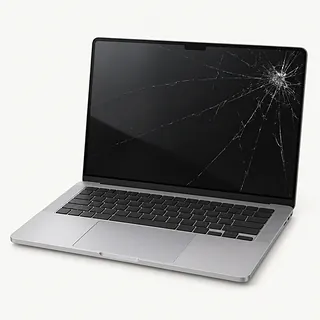
MacBook Air screen broken
Dark blotches around a fracture usually come from a broken panel. Changing just the glass won't restore those missing parts of the picture.
Find a repair near you: MacBook Air screen broken
Laptop gets hot
Busy apps generate heat, and cushions can block ventilation. Keep the laptop on a hard surface with its vents clear.
Find a repair near you: Laptop gets hot
Picture flashes when the lid moves
Flashing at particular screen angles suggests trouble with the display or its cable. Repeatedly flexing the lid won't fix the connection.
Find a repair near you: Picture flashes when the lid moves


How a shop tests a MacBook
Showing the shop exactly when trouble happens helps it test the right thing. A picture that disappears as you tilt the screen needs different checks from a laptop that stays silent. For charging trouble, bring your cable and adapter.
The exact MacBook model matters when ordering parts. A cracked panel commonly gets replaced with a complete display assembly. Failed keys can mean changing the surrounding top case too, with working parts transferred from the old one. Have the shop write down what's being replaced and any software setup that follows.
Testing afterward should recreate the trouble that brought you in. Try the repaired computer with its charger connected, then unplug it. After keyboard replacement, type across the keys and click the trackpad. Move a replaced screen through normal opening angles and adjust its brightness.
What matters before approving a repair
A battery swap makes sense if the MacBook otherwise handles your work. Age matters more when the computer no longer gets macOS security updates or runs the apps you depend on. Check both before approving hardware work.
Count the faults you'd still have after the repair. A cracked display changes the decision if the keyboard also skips letters. Ask for a written quote covering both, and ask if the matching parts are available.
Files without a backup may need attention first. Apple silicon MacBooks have encrypted storage soldered to the logic board, so a dead board doesn't leave a separate drive to remove. Ask about data recovery before replacing it. If the laptop works, back up with Time Machine or copy files to cloud storage.
What to ask before a MacBook repair
Can you separate testing from repair on the quote?
You need to know what you'd owe if you pick it up unrepaired. Have the shop call before adding another repair to the bill.
Does fixing this keyboard mean changing the top case?
On many MacBooks, the keyboard is fixed into that larger assembly. Ask which pieces will change, who made the replacement and whether it was taken from another laptop.
Who will use the login?
A test account may be enough for some checks. Discuss which folders someone would open and any step that could wipe data before handing over a password.
How will you show that the original problem is fixed?
Have the starting fault written down, then repeat the test once the repair is finished. For keys that skip letters, that means typing with those keys.
Does the warranty pay for installing another part?
Coverage for replacement hardware alone may leave you paying for the work again. Get a written copy that explains both, plus how to report a repeat failure.
What to save and bring
Describe the first failure
Record when it started, such as keys repeating after a spilled drink. Liquid can corrode the board after drying, so turn a wet MacBook off and disconnect its charger.
Check your saved copies
Open a few backed-up files from another device. If nothing is saved elsewhere and the laptop runs, use cloud storage or Time Machine before leaving it.
Choose a test login
A spare Mac user account might cover the checks. Ask what access the job needs, without sharing the password you use for your Apple Account.
Keep account changes in your hands
The shop can explain whether to disable Find My for this job. Handle that setting yourself.
Leave unrelated accessories behind
Take off a clip-on cover and unplug hubs and storage drives. Pack your power adapter with its cord if the battery won't charge, and remove any memory card.
Related repairs
MacBook Repair: common questions
How do I find someone nearby to repair my MacBook?
67 shops say they do MacBook repair. Choose your city, then call with your exact model and explain what's wrong.
What affects the repair bill for my MacBook?
Some faults take more work to address than others, which can change the cost of MacBook repair. Describe the symptoms and name the model over the phone, then request an itemized quote.
How soon could work on my MacBook be finished?
Tell the shop what happened to your MacBook and ask when the work might be finished. The damage and workload can change that estimate.
What makes my MacBook worth repairing?
If the only copy of an important file is on the device, that matters too. Ask for a quote, then weigh the cost, its age, any other faults and what keeping it is worth to you.
Is there anything to sort out before MacBook repair?
Back up files you can reach while your device is working, and write down its exact model plus what stopped working. When booking by phone, check whether the charger should come along, the case should stay on and a passcode will be needed.
Why won't my MacBook turn on?
A blank display can make a working MacBook look dead, though its charger or internal power parts could also have failed. Listen for startup audio and look for lit keys, then test a suitable spare adapter at a different outlet.
Why is my MacBook not charging?
Your MacBook's battery isn't the only possible cause of charging trouble. Try a suitable spare charger and cord at another outlet to rule out those parts. Replacing a worn battery won't fix a broken charging port.
How do I know if my MacBook needs a battery replacement?
Short battery life or shutting down when unplugged can mean your MacBook needs its battery replaced. Check the battery condition reported by macOS. Service Recommended is another reason to have it tested.
Does a flickering MacBook screen need replacing?
Screen replacement can fix flickering when the display itself is at fault. Describe whether it happens during startup or after opening an app so the shop can test that behavior. The usual replacement includes the lid, rather than just glass.
Why is my MacBook keyboard not working?
A keyboard fault can make letters repeat or leave keys silent, particularly with butterfly keyboards. Restart the MacBook to rule out a temporary software glitch. The keyboard may be fixed into the top case, so both may be replaced together.
Can my files be recovered if my MacBook won't turn on?
Recovery can be possible, depending on what broke and which MacBook you have. Apple silicon machines keep encrypted data on storage soldered to their boards, so board repair may be needed to reach it. A backup gives you another place to check for saved copies.