
Find MacBook Pro Screen Replacement Near You
For MacBook Pro screen replacement, you can browse 7 shops that say they offer it. Pick your state, then look for your city.

Signs your MacBook Pro display needs work
MacBook Pro display flickers
A worn screen connection can make the image blink when you adjust its angle. Flashing inside just one program suggests software instead. Restart unless liquid got inside, and note which apps show the flicker.
Find a repair near you: MacBook Pro display flickers
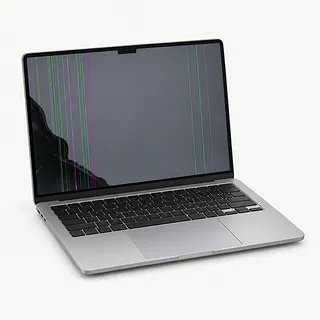
Screen cracked with black streaks
Dark streaks beside a fracture come from damage inside the panel. Even when much of the desktop remains readable, replacing the outer glass alone won't bring back those missing areas. MacBook repairs commonly swap the assembled display and lid.
Find a repair near you: Screen cracked with black streaks
Screen black but laptop makes sounds
Startup audio suggests the computer has power despite the dark picture. Connect another monitor with a suitable cable or adapter. If your desktop appears there, suspect the laptop screen or the wiring feeding it.
Find a repair near you: Screen black but laptop makes sounds
Screen hinge feels loose
Worn hinges and damaged mounts can let the lid wobble as you type. Changing only the panel won't fix a broken attachment. Mention that wobble when asking about screen replacement so the hinge gets checked too.
Find a repair near you: Screen hinge feels looseDisplay has fixed colored bands
Bands that stay in place can come from a failing cable or broken panel. Their color doesn't tell you which part failed. Describe any drop that happened before they appeared.
Find a repair near you: Display has fixed colored bands


How the MacBook Pro display gets replaced
Flickering that changes with opening angle calls for a cable check. A shop can test another monitor alongside the laptop's own display to help find the fault. After a fall, the technician also looks for bent hinges and broken mounts.
MacBook Pro screens generally get replaced as assembled lids with the glass and panel attached. The exact model matters when ordering that part. Get a quote that says what comes with it, what gets reused from your computer and whether it needs software setup.
The finished job should pass the test it failed when you brought it in. Read a document and watch for blinking as you tilt the screen normally. Check that brightness changes work, open a camera preview and make sure the hinges don't let the display tip backward.
Deciding what to do with a broken display
A new display won't rescue a MacBook Pro that no longer runs the programs you need. Check app requirements and macOS security support before repairing an older model. Keeping it makes more sense if the cracked screen is the main thing stopping you from using it.
Sticky keys, weak battery life and damaged hinge mounts can turn a screen swap into a larger repair. Have the shop put those jobs into one written quote and ask if it can get the correct screen.
Save photos and documents elsewhere while the computer still works. On Apple silicon models, encrypted storage chips stay soldered onto the logic board. When the board has failed and those files aren't backed up, talk about recovery before approving a board swap.
What to ask about the screen repair
What happens if the new display starts flickering?
Have the repair warranty spell out how to report a fault, what it leaves out and whether another screen and labor are covered.
Which checks will you repeat once the screen is installed?
A picture appearing is only part of the check. Have brightness adjustment, the camera and waking from sleep tested, with existing faults noted beforehand.
Is this an unused display or one from another laptop?
Get the supplier's name and matching model in writing. MacBook Pro screen replacement usually involves the lid assembly, so ask exactly what you're getting.
How much work am I agreeing to before you call?
Paying to find the fault doesn't mean you've agreed to replace parts. Ask what you owe if you pick up the computer unrepaired.
Why would you need access to my usual account?
A temporary login may cover display tests. Decide which personal folders can be opened, and mention missing backups if the job grows beyond swapping the screen.
Get ready for the screen repair
Describe the flicker or blackout
Write when it began and what happened just before it started. A phone video can show a picture that cuts out as you lift the lid.
Make another copy of your files
Back up photos and documents while you can still reach them. Tell the shop about anything saved only on this laptop.
Unpack the accessories
Disconnect USB devices and take out removable storage cards. Leave a detachable protective cover behind and ask about bringing the power adapter.
Limit access to your account
Find out which display tests need a password. Another macOS user may work without sharing your everyday login.
Keep control of Apple settings
Don't share your password for Apple Account sign-in. Leave Find My enabled unless the counter explains why you need to turn it off yourself.
Related repairs
MacBook Pro Screen Replacement: common questions
Where can I get MacBook Pro screen replacement close to home?
In their own words, 7 shops offer MacBook Pro screen replacement. Pick a place in your city and ask whether they can work on your exact model.
How do I budget for MacBook Pro screen replacement?
Some faults take more work to address than others, which can change the cost of MacBook Pro screen replacement. Describe the symptoms and name the model over the phone, then request an itemized quote.
Could heavy damage make MacBook Pro screen replacement take longer?
You can ask the shops to explain what their time estimate depends on. When you call, mention the damage and check how busy they are.
Would I be better off replacing my MacBook Pro?
Get a quote for MacBook Pro screen replacement before deciding. Compare the cost with how much you still use the device, how old it is, anything else that's broken and any files you need from it.
Which questions should I ask before dropping off my MacBook?
Get your model number and a short account of what happened ready for the call about MacBook Pro screen replacement. Ask about the charger, case and passcode, and back up any files you can if the device is working.
Why is my MacBook Pro screen black?
A working picture on a separate monitor points to trouble with the MacBook Pro display or the cable feeding it. The black screen alone doesn't tell you which part has failed.
Why does my MacBook Pro screen flicker when I move the lid?
A flickering picture that reacts to opening the laptop often comes from its screen cable around the hinge. The panel may still work, so this clue helps narrow down what needs testing.
Why does my MacBook Pro screen have uneven light at the bottom?
A worn cable can leave the screen's bottom unevenly lit on certain 2016 MacBook Pro models and 2017 MacBook Pro models. The cable bends as you open and close the computer, which can wear it out.
Can just the glass be replaced on a MacBook Pro screen?
MacBook Pro screens are usually replaced as a complete display assembly, including the lid. Even when you can only see a crack in the glass, the repair often involves that whole assembly.
Will replacing my MacBook Pro screen erase my files?
Screen replacement itself doesn't normally erase stored files, but back up first. Apple silicon MacBook Pro models have soldered, encrypted storage, so a dead logic board leaves no separate drive to pull out.