
Find MacBook Screen Repair Near You
In their own words, 25 shops offer MacBook screen repair. Browse the states to find help close to home.

MacBook repair in Philadelphia, PAMacBook screen repair in New JerseyMacBook screen repair in Pennsylvania
MacBook screen problems and their causes

MacBook Air display has a split
A knock against the edge can leave a thin split through the image, even with little damage outside. That fracture won't disappear after a restart. Repairs commonly replace the screen along with its lid as one piece.
Find a repair near you: MacBook Air display has a split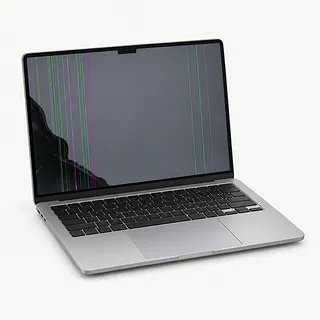
MacBook Pro screen has missing sections
Impact can break part of the panel while leaving the rest readable. Missing blocks of picture or colored bars can also involve its connection. Tell the shop what happened before the change so it can test both.
Find a repair near you: MacBook Pro screen has missing sectionsMacBook picture flashes on and off
Wiring around the hinge is suspect if opening your MacBook triggers flashing. When it blinks while sitting untouched, restart unless there's been liquid exposure. Note whether switching programs stops the flicker or leaves the entire desktop blinking.
Find a repair near you: MacBook picture flashes on and off
MacBook running with no picture
Normal output on a separate monitor makes a fault in the laptop display or cable more likely than graphics trouble. After a spill, turn the MacBook off and unplug it instead of testing monitors. Liquid can keep corroding the board after drying.
Find a repair near you: MacBook running with no picture
MacBook lid catches when opening
Bent metal or a damaged hinge mount can make the lid bind partway open. Stop where it catches rather than forcing it farther. A replacement screen won't straighten the case underneath.
Find a repair near you: MacBook lid catches when opening


How a MacBook screen gets repaired
Testing the display connection comes before ordering a screen for unexplained flicker or blackouts. A shop can also check the output to a separate monitor. If yours fell, have the bent edges and hinge mounts checked along with the picture.
Replacing a MacBook display generally means removing its lid and putting on a matching assembled replacement. The glass isn't usually changed by itself. Ask how they'll match the part to your particular computer, what they'll transfer from the old lid and whether the repair needs software setup.
Try a photo across the repaired screen and watch for bands or uneven lighting. Test brightness changes and open the camera. Move the lid through its normal travel to check that the image doesn't drop out or the hinges catch.
Should you keep your MacBook
Several broken parts can make another computer more sensible than a screen repair. A loose charging port or damage from a spill belongs in the same written quote as the display. Check that someone can get the correct assembly before approving work.
Age alone doesn't settle the decision. An older MacBook may still suit you if its programs work well and its supported macOS releases receive security fixes. Judge what you'll be able to do with it after repair.
Missing backups matter even if you stop using this laptop. In Apple silicon MacBooks, storage chips are soldered onto the board and the data is encrypted. Replacing that board won't bring your old files along, so discuss recovering them before agreeing to a swap.
Questions before agreeing to a screen replacement
Which replacement would you install on this MacBook?
Ask where the display comes from, whether it's new or used, and how it's matched to your model. Get the parts and labor written into the quote.
What makes the screen the likely cause?
A normal picture on another monitor points toward the laptop display or its cable. Flicker tied to lid movement is worth mentioning before anyone orders a panel.
Can you check the camera and brightness too?
Have both tested before work begins and again with the replacement installed. Also check that closing and reopening the lid brings the picture back.
Would the repair warranty cover another screen and labor?
Get the terms on paper, including exclusions and the steps for reporting a fault.
Who would use my Mac login?
Set limits on opening personal folders. A separate account may be enough for testing.
What would I owe for testing without repair?
Agree on that charge upfront. Ask for a call before extra work starts.
Get your MacBook ready for screen repair
Put the screen trouble in writing
Describe colored stripes, a black picture or flickering, plus when you first saw it. Include any accident and changes with lid angle.
Protect photos and files
Run Time Machine or copy important folders online before leaving the computer. A working external display can help you reach them.
Keep control of account access
Settle how the shop will sign in for screen checks, perhaps through a dedicated test user. Apple Account sign-in details should stay with you.
Review requests to change Find My
Only turn it off after hearing why it's needed for this job. Make the change personally.
Clear attached equipment
Remove the detachable cover and disconnect USB devices. Eject a storage card if present, and ask about packing charging equipment.
Related repairs
MacBook Screen Repair: common questions
Who should I call about MacBook screen repair in my area?
Find your city to see which of 25 shops say they do this work near you. Give them your model name when you call.
How much does MacBook screen repair cost?
Any parts needed can affect the price, as can the work involved. Call about your MacBook, explain the fault and ask for the full quoted cost.
Can a shop estimate how long MacBook screen repair will take?
Tell the shop what happened to your MacBook and ask when the work might be finished. The damage and workload can change that estimate.
Is a repair quote enough to tell me whether to replace a device?
Ask for a quote before deciding, and weigh it against how much you'd want to keep using your device, its age, anything else that needs repair and the importance of the files it holds.
How can I get ready for MacBook screen repair?
If the device works well enough to copy files, save what you can and note its model number and symptoms. Call to check what to do about a passcode, protective case or charger.
Why is my MacBook screen black?
The panel isn't necessarily broken just because your MacBook has no picture. Restart the computer and try another display. If that picture looks normal, the laptop's own screen and cable are the likely suspects.
Why does my MacBook screen flicker when I move the lid?
Flickering that changes with lid movement points toward the display cable or hinge area. That pattern doesn't prove the panel has failed, so describe the angle that triggers it before agreeing to a replacement.
Can just the glass on a MacBook screen be replaced?
Glass alone usually isn't the part swapped during MacBook screen work. Many models combine it with the panel, and replacing the complete lid is common. Have the shop describe what stays and what gets replaced.
Can a cracked MacBook screen still work?
Yes, your MacBook may keep displaying a readable image despite broken glass. The picture alone doesn't tell you how much damage is inside. Save important files elsewhere and keep pressure off the cracked area.
Will MacBook screen replacement erase my files?
Replacing the screen normally leaves your files in place because the display doesn't store them. Back up before repair anyway. If testing points to a damaged logic board, ask what that means for the saved data.
Are MacBook Air and MacBook Pro replacement screens interchangeable?
MacBook Air and MacBook Pro screens aren't general substitutes for each other. The replacement needs to match your particular model and its display specifications. Equal screen size doesn't settle the match.