
Find MacBook Air Screen Replacement Near You
Browse cities across the country to find 6 shops that list MacBook Air screen replacement. Before you go, call with your model and explain what's wrong.

MacBook Pro repair in Philadelphia, PAMacBook Air screen replacement in Pennsylvania
Cracks, flicker and blank screens

MacBook Air screen cracked
A hit against the lid can leave a fracture across the picture, with black areas where text used to be. MacBook Air screen replacement often involves the complete display assembly, though some repairs keep the existing lid and replace the damaged panel.
Find a repair near you: MacBook Air screen cracked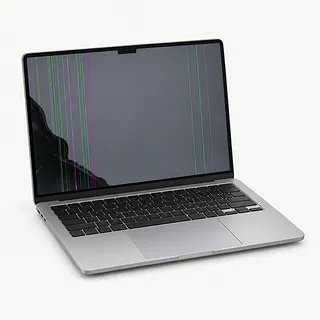
Screen keeps flickering
Flashing that follows changes in lid angle usually comes from the display cable or hinge area. If it happens with the laptop sitting still, note which apps are open. Try a restart unless there's been a spill.
Find a repair near you: Screen keeps flickering
Screen black with laptop on
A failed screen can leave the Air running with nothing visible. Connect an external monitor using a cable or adapter that works with your model. A clear desktop there points toward the built-in display or its connection.
Find a repair near you: Screen black with laptop onLines across the screen
Colored bars can come from a damaged panel or its wiring. A shop can test both before recommending a display swap. Tell them if the lines appeared after the laptop fell.
Find a repair near you: Lines across the screen
Lid feels loose
Loose hinges or damaged mounts can let the display wobble as you type. Don't wedge something against it to hold it steady. The attachment points need checking along with the screen.
Find a repair near you: Lid feels loose


What goes into a MacBook Air screen replacement
Show what makes the image fail, especially if your Air behaves normally at the counter. The shop can test its screen connection and compare output through a separate display. Mention resistance when opening it so they check for bent hinge attachments too.
A complete display assembly is a common repair method, but replacing just the damaged panel is possible on some Air models. The replacement needs to match your particular computer. Get an explanation of what comes with yours, what carries over from the broken one and any setup the technician needs to finish.
Testing the finished job means checking more than a lit screen. Look across light and dark backgrounds for uneven patches, change brightness and test the camera. Move the lid through its normal travel, watching for blinking or a hinge that won't stay put.
Is another screen worth installing
A broken screen is worth fixing if you'd otherwise keep using the Air. For an older model, check that it runs your everyday apps and a macOS version that still gets security updates. Ask whether a matching replacement screen is available.
Count the other repairs before approving the screen. A battery that barely holds charge or keys that skip letters belong in the written quote too. If you'd still want another laptop after those repairs, replacing this one may make more sense.
Save photos and documents through an external monitor if that still works. M1 and later MacBook Air models have encrypted storage soldered to the logic board. If that board also fails, there's no separate drive to remove for your files.
What to settle at the repair counter
Will you ask before erasing anything on this Mac?
Replacing a screen normally leaves files alone. Mention anything you haven't backed up, and settle who can sign in to test the repair.
Which display parts does the estimate cover?
Have the estimate name the assembly being installed and where it came from. It should also say if another laptop used it first and which Air model it matches.
What will you check besides the picture?
Have the camera tested before repair and again afterward. Try changing brightness and closing then reopening the lid to check that the picture returns.
How would I get a faulty replacement fixed?
Keep the warranty paperwork. It should spell out excluded faults, where to bring the laptop back and any charge for installing another display.
Does an unrepaired laptop still come with a testing bill?
Agree on a testing charge before leaving the computer. Finding a second fault doesn't give permission to fix it.
Save your files and note the symptoms
Note what happened before the screen failed
Write down when the trouble began and if opening the Air farther changes the picture. Include a knock or spill, even one that seemed minor.
Make sure another copy exists
Save needed files online or back up with Time Machine while the Air still works. If nothing is readable, tell the counter which folders have no backup.
Set up access for testing
Ask what needs a Mac login and if a spare user will do. The password used for your Apple Account should stay with you.
Handle Find My personally
Leave it enabled unless the shop explains that screen work needs it turned off. You can make the change without sharing account passwords.
Pack only what's needed
Leave storage accessories at home and detach any snap-on case. Check about bringing the power adapter and charging cable.
Related repairs
MacBook Air Screen Replacement: common questions
How can I check who offers MacBook Air screen replacement nearby?
In their own words, 6 shops offer MacBook Air screen replacement. Pick a place in your city and ask whether they can work on your exact model.
How much would I pay to have my MacBook fixed?
To get a price for MacBook Air screen replacement, call and explain what's failing on your particular model. The fault affects how much work is needed, so ask for the quote to spell out that work.
How soon could work on my MacBook be finished?
Until the shop understands the damage, they may only be able to give a broad estimate for MacBook Air screen replacement. Phone to discuss the likely wait and how their schedule could affect it.
Am I putting too much money into my MacBook?
The cost of MacBook Air screen replacement is only part of the decision. Ask for a quote before committing, then factor in the device's age, any separate damage, data you care about and how well it still suits you.
What should I do before booking MacBook Air screen replacement?
Write a note naming the exact model and the trouble you've noticed, then back up whatever the device still lets you access. Ask the person you call whether to pack the charger, remove the case or change any passcode.
Why is my MacBook Air screen flickering?
A picture that flashes when you tilt the lid often points to the display cable or hinge area. Holding it at one angle can hide the flicker without fixing anything.
Why is my MacBook Air screen black but the laptop is on?
The built-in screen or its cable may have failed even though the MacBook Air is still running. A normal picture on an external monitor helps narrow it down to that screen or connection.
Can just the cracked glass on a MacBook Air be replaced?
MacBook Air screen replacement generally involves swapping the complete lid assembly rather than only changing the glass. The panel comes with that assembly, even when it still shows a picture.
Will replacing my MacBook Air screen delete my files?
Your files normally stay where they are during a screen replacement. Back them up if the laptop still works. On M1 and later MacBook Air models, the storage is soldered and encrypted, so a dead logic board can also block access to your files.
Can I use an external monitor with a broken MacBook Air screen?
Yes, a separate monitor can give you a usable picture if the MacBook Air still runs and the fault is limited to its screen. That can help you copy files or finish something you were working on.