
Find iPad Pro Screen Replacement Near You
According to their own websites, 4 shops take on iPad Pro screen replacement. Go to a state or city to look closer to home.

iPad Pro Screen Replacement by city
Common iPad Pro screen problems
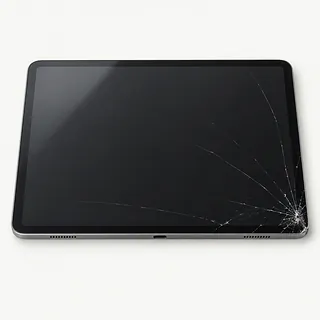
iPad Pro screen cracked
Pressure inside a tightly packed bag can fracture the glass even without a drop. The iPad Pro has a laminated screen, so repair usually replaces the bonded glass and display together, including when the picture looks fine.
Find a repair near you: iPad Pro screen cracked
Touch screen not working
A damaged touch layer can leave keyboard letters unresponsive while nearby keys still work. If there's no visible break, clean and dry the surface, then restart. Pressing harder won't fix a broken touch layer.
Find a repair near you: Touch screen not working
iPad Pro screen stays black
A blank screen can mean failed display hardware, stalled software or no battery power. Try another working charger and cable, followed by the correct force restart for your model. Mention any sounds the iPad still makes.
Find a repair near you: iPad Pro screen stays black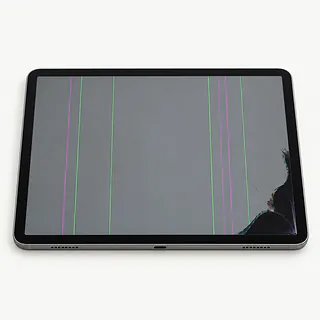
Bright lines through the picture
A narrow colored line after an impact usually points to a broken panel beneath the surface. The glass may still feel smooth. Changing only the outer glass won't remove a line caused by panel damage.
Find a repair near you: Bright lines through the picture
Screen keeps tapping by itself
Cracked touch layers can send taps you didn't make. Disconnect the charging cable and wipe away moisture before testing again. If unwanted taps persist, a shop can test the screen before choosing a replacement.
Find a repair near you: Screen keeps tapping by itself


What iPad Pro screen replacement involves
The technician tries the taps that fail and checks whether a dark iPad still powers on. A frozen app or drained battery can look like screen trouble. The case gets checked too, since installing fresh glass against a bend can break it.
Replacement usually includes both the glass and picture panel because they're bonded together. Give the shop your exact iPad Pro model, since matching the size isn't enough to pick the part. An older model's original Touch ID button may need transferring, while face recognition sensors stay protected on versions with Face ID.
Those unlock sensors are paired to your tablet. Some newer models support Apple's calibration process for genuine sensor replacements. Before closing out the repair, the technician should try letters across the keyboard, drag a finger into corners, check the image and test charging, buttons and unlocking.
What to weigh before replacing the screen
Drawings with no backup may be worth recovering even if you're done with the tablet. Say which files matter before agreeing to a reset. Screen repair doesn't normally call for erasing the iPad, though it can't substitute for a backup.
Fixing the glass makes sense when you'd happily keep using the repaired iPad Pro. With an aging model, check Apple's security update support and the requirements of your drawing or editing apps. If it already struggles with your work, another device may suit you better.
Ask about screen availability and include battery wear, a twisted frame or a loose charging connection in the written estimate. Those faults still need attention after the picture works again.
Before agreeing to the screen repair
Does the warranty cover touch problems as well as the picture?
A screen can show a clear picture yet miss taps along an edge. Request the warranty on paper, including its limits and whether a covered repair includes both the display and labor.
Which display are you planning to use?
Glass and display are bonded on iPad Pro models, so repairs usually replace them together. Have the estimate identify the screen's maker, supplier and any previous use or rebuilding.
Can you test unlocking and touch before taking it apart?
Record features that already fail, then repeat those checks when the repair is finished. Check the body for bends too, since a crooked frame can crack another screen.
What do I pay if I stop after testing?
Get that fee settled up front, even if you later decide the tablet isn't worth fixing.
Could I enter the passcode myself for your checks?
Find out who needs access and why. Tell the shop to ask you before deleting data or resetting the iPad.
What if it still misses taps with the replacement installed?
Set a payment limit for a screen swap that doesn't help. Don't leave further work open ended.
Before handing over your iPad Pro
Describe the screen's behavior
Write down when the fault began, including any drop or liquid exposure. A black picture with notification sounds is different from an iPad that seems completely off.
Check the backup result
Use iCloud or connect to a computer to save your data while the screen responds. Confirm the backup completed before handing over the tablet.
Pack only what helps testing
Detach the cover and accessories unless one helps reproduce the problem. Keep a removable SIM separately when cellular service isn't being checked.
Decide who can use the passcode
Ask what requires an unlocked screen and who will handle it. Entering your code in person may be enough for some tests.
Ask why Find My needs disabling
Get an explanation before changing Find My settings. Handle the request through your own account without sharing its password.
Related repairs
iPad Pro Screen Replacement: common questions
Who can I ask about fixing my iPad?
Use the state and city links to explore 4 shops that list this service. Call before making the trip and describe the problem with your model.
How much would I pay to have my iPad fixed?
The damage can affect how much work your device needs. Explain what happened, name the model and ask for a quote by phone.
Could heavy damage make iPad Pro screen replacement take longer?
Until the shop understands the damage, they may only be able to give a broad estimate for iPad Pro screen replacement. Phone to discuss the likely wait and how their schedule could affect it.
What matters most when choosing between repair and replacement?
If there's other damage, a quote for iPad Pro screen replacement may cover only part of what needs doing. Get the cost before choosing, then think about the device's age, whether you'd use it again and any files you need.
Which questions should I ask before dropping off my iPad?
Jot down the full model number and how the trouble started so you can explain it when you call. Ask about bringing a charger, keeping the case attached and unlocking the device, and back up files if it works.
Can just the glass be replaced on an iPad Pro?
Most iPad Pro screen repairs replace the complete display assembly, even when the picture still works. The glass and panel are laminated together, so a glass crack usually means replacing more than the outer surface.
Why is my iPad Pro touch screen not working?
A frozen app or a broken touch screen can both leave an iPad Pro ignoring your finger. Restart it first. If the same keyboard letters won't respond afterward, note where those keys sit on the display.
Does an iPad Pro black screen need replacing?
A black screen alone doesn't tell you that an iPad Pro needs a new display. Try a working charger and cable, then a force restart. A shop can test the screen and power before you approve parts.
Will Face ID still work after iPad Pro screen replacement?
Face ID can keep working after a screen replacement if its original parts remain undamaged. On an iPad Pro with Face ID, those parts are paired to the device, so changing the display alone won't fix broken facial unlocking hardware.
Can a bent iPad Pro have its screen replaced?
It depends on how badly the iPad Pro's body is bent. The replacement needs to sit properly in the frame. If a corner presses against the glass, another crack can start there.