
Find Hard Drive Recovery Near You
For hard drive recovery, you can browse 39 providers that say they offer it. Pick your state, then look for your city.
Hard Drive Recovery by city
Common reasons files become inaccessible
External drive not recognized
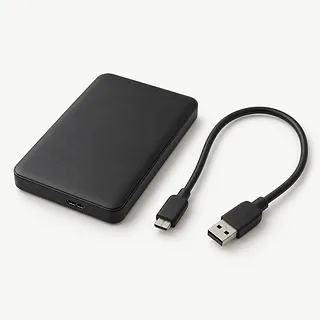
The USB cable or enclosure electronics may have failed while the disk inside remains readable. A cable swap is reasonable for a quiet, undropped unit. If the computer asks to initialize it, cancel.
Find a repair near you: External drive not recognizedFiles deleted by mistake
Deletion can mark disk space as available without removing all its contents. Continued use risks writing over those contents. Keep recovery programs and recovered files off the source disk.
Find a repair near you: Files deleted by mistake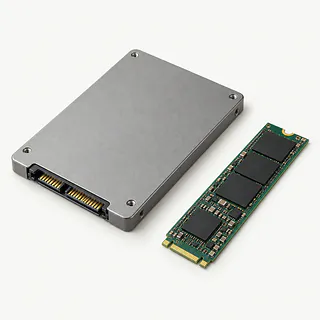
SSD disappeared from the computer
Loose connections and electronic faults can both prevent detection. A shop can test which is responsible. SSD recovery differs from hard disk work, and deleted content may already be lost through TRIM.
Find a repair near you: SSD disappeared from the computer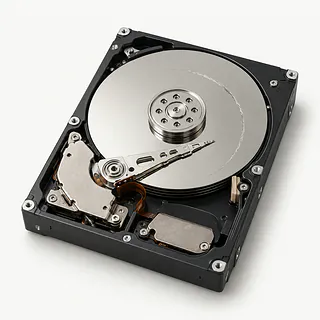
Hard disk makes a clicking sound
Mechanical trouble often causes repeated clicks, grinding or beeps. Disconnect power rather than retrying startup. Another attempt can leave more scratches on the platter surface.
Find a repair near you: Hard disk makes a clicking sound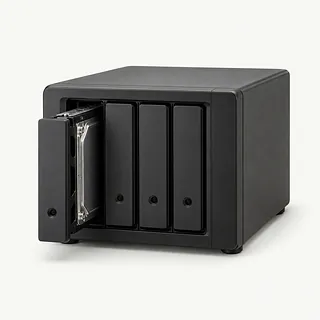
NAS volume missing after disk failure
An array can become inaccessible when member disks fail or its settings change. Record each disk's slot before anything gets moved. Avoid rebuilding the RAID while recovery is still needed.
Find a repair near you: NAS volume missing after disk failureDrive asks to be formatted
Damaged records that organize files can make a disk look unformatted. Failing hardware can produce a similar message. Formatting writes new records and can complicate getting the original files back.
Find a repair near you: Drive asks to be formattedExternal disk stopped working after a fall
A fall can damage moving parts without leaving a dent. Don't power the disk up for a test, even if it was silent after the impact.
Find a repair near you: External disk stopped working after a fall


Getting files off a failed drive
Recovery starts by checking whether the fault is in the connection, the file system or the drive itself. Tell the technician about clicking, drops and anything already tried. An accidentally deleted folder calls for different work from a disk with broken parts.
For a readable drive, the technician generally makes a sector copy and searches that copy for files. Failed heads may need replacing before the disk can be copied. That means opening it in a clean room or clean bench because dust can damage the platters. An SSD has no heads to swap. Readable SSDs with logical corruption may be handled with imaging and recovery software.
BitLocker and FileVault encryption need the password or recovery key. Recovered folders go onto separate storage, where sample files are opened to check that their contents are readable. Ask which folders couldn't be recovered. Getting documents back doesn't mean the operating system and programs will run again.
When hard drive recovery makes sense
A replacement drive won't bring back lost files. Recovery may still be worth pursuing for the sole copy of a project or photo collection. Before committing, open any backup you have and check for missing documents.
An aging computer doesn't have to stay in use for its contents to matter. If it can't run supported software or has a broken hinge as well, moving recovered files to another machine may make more sense than repairing it.
Donor heads aren't interchangeable across all hard disks, so ask whether matching parts are available. Request a written recovery quote, including storage for the retrieved files. A disk with failing parts shouldn't hold the only copy again.
What to ask about hard drive recovery
Ask who will actually work on the drive. Recovering deleted documents and replacing failed heads call for different equipment.
Will you recover the files here or send the drive elsewhere?
Get the name of whoever will handle it and who will answer questions. A local drop-off counter may send recovery work to another location.
What happens if the drive needs to be opened?
Head replacement belongs in a clean room or clean bench. Dust can ruin the platters that hold the files.
Who can see the recovered files?
Ask how access is limited, how files are handed back and when retained copies are deleted.
Is there a testing fee if recovery doesn't go ahead?
Have the testing charge and approval process put in writing before leaving the drive.
What happens if the files I need aren't recovered?
Specify the folders that matter. Ask how partial results affect the bill and whether the original drive is returned.
Before handing over your hard drive
Keep a mechanically failing hard drive powered off. Repeated attempts to get it recognized can make the damage worse.
Bring the error message
Copy the error message exactly, and note when it appeared and any clicking or beeping. Include the names of recovery programs you've tried.
Look for copies on other storage
Check cloud backups or a separate backup disk from another computer. Making a fresh backup isn't a reason to power up damaged hardware.
Get passwords ready
An encrypted disk needs its recovery key or password to unlock the files. Discuss computer access and account changes with the shop before drop-off.
Pack only what's needed
Ask about bringing the external drive's original power supply. Take unrelated memory cards out of accessible slots, but keep the drive enclosure intact.
Keep array order intact
With a NAS or RAID, mark accessible bay positions without taking anything apart. Avoid rebuilding the array.
Related repairs
Hard Drive Recovery: common questions
Where should I start looking for hard drive recovery?
Pick a city when looking for hard drive recovery. The 39 providers around the country list the work on their own sites, so call someone local with the model name and describe the problem.
Does the charge for hard drive recovery depend on what's wrong?
You can help the providers price the job by naming your model and describing the fault. Ask which work that estimate would cover.
Why can hard drive recovery take longer than expected?
Ask the shop how the damage could affect the timing. Check how busy they are when you call for an estimate.
When is it time to stop repairing an old device?
Check whether the files you care about are saved somewhere else. Then get an estimate before making a decision, comparing the cost with your device's age, any further damage and the use you'd get from keeping it.
What is worth writing down before hard drive recovery?
Back up files you can reach while your device is working, and write down its exact model plus what stopped working. When booking by phone, check whether the charger should come along, the case should stay on and a passcode will be needed.
Why is my external hard drive not showing up?
A bad cable or port can hide an external hard drive from the computer, though the disk itself may have failed. If it hasn't been dropped and sounds normal, try another compatible cable. Disconnect it if clicking, grinding or beeping starts.
Why is my hard drive clicking or beeping?
Repeated clicking or beeping usually means something mechanical has failed inside the hard drive. Shut it down and leave it off. Reconnecting it for another try can scratch the platters further and reduce what can be recovered.
Can I recover deleted files from a hard drive?
Recovery can work after deletion when the original file data remains on the disk. Avoid further use of the affected drive, including installing a recovery program there. New writes can replace the missing documents or photos.
Can data be recovered from an SSD?
Some SSD data can be recovered, but TRIM often makes deleted files unrecoverable. A failed SSD needs specialized tools. Tell the person handling recovery if files were deleted or the SSD simply stopped appearing on the computer.
Can files be recovered from a dropped external hard drive?
A dropped external disk isn't automatically beyond recovery, though damaged mechanical parts can limit what comes back. Leave the power disconnected rather than checking whether another attempt makes it appear on the computer.
How does hard drive recovery work?
The recovery method depends on what prevents access to the files. Software can help retrieve deleted documents or read a corrupted disk, while broken mechanical parts may need replacing. Work on exposed platters belongs in a properly controlled clean workspace.